
CENTER FOR MEDICARE AND MEDICAID SERVICES
The Centers for Medicare & Medicaid Services (CMS), is a federal agency within the United States Department of Health and Human Services (HHS) that administers the Medicare program and works in partnership with state governments to administer Medicaid, the Children's Health Insurance Program (CHIP), and health insurance portability standards. In addition to these programs, CMS also provides a lot of material pertaining to educational products for major initiatives, such as the Health Insurance Marketplace, Medicare Open Enrollment, information on HIPPA and much more. These are available in multiple languages and multiple formats like print, audio, CD etc, through their Product Ordering Website or POW.
The Project involved redesigning the POW using a Human Centered Design approach. While some features of interaction design was requested to be enhanced, there was a specific request/a constraint to not change the look and feel of the system, This project was awarded to clearAvenue which subcontracted with Jyothi from MIND YOUR GAPS as the HCD expert, to conduct the entire Human Centered Design aspect of this project.
Our team consisted of a Project Manager/Architect/Senior Developer, the HCD expert, and 3 developers. The Project Manager was also the agile team leader. The PM, two developers, and the HCD expert participated in the front end requirements, design and testing. One of the developers focused on backend and database design.
PROBLEM STATEMENT
Problematic User Experience with using the POW ordering system.
There were multiple user Interface problems present in the CMS POW legacy system:
METRICS
Customer satisfaction, Fewer help desk tickets, accessibility issues solved
PROJECT TIMELINE: The entire project is ongoing with a base year and four option years. The initial product had to be operational and in production three months from the date of contract award with the associated Authority To Operate (ATO).
The Centers for Medicare & Medicaid Services (CMS), is a federal agency within the United States Department of Health and Human Services (HHS) that administers the Medicare program and works in partnership with state governments to administer Medicaid, the Children's Health Insurance Program (CHIP), and health insurance portability standards. In addition to these programs, CMS also provides a lot of material pertaining to educational products for major initiatives, such as the Health Insurance Marketplace, Medicare Open Enrollment, information on HIPPA and much more. These are available in multiple languages and multiple formats like print, audio, CD etc, through their Product Ordering Website or POW.
The Project involved redesigning the POW using a Human Centered Design approach. While some features of interaction design was requested to be enhanced, there was a specific request/a constraint to not change the look and feel of the system, This project was awarded to clearAvenue which subcontracted with Jyothi from MIND YOUR GAPS as the HCD expert, to conduct the entire Human Centered Design aspect of this project.
Our team consisted of a Project Manager/Architect/Senior Developer, the HCD expert, and 3 developers. The Project Manager was also the agile team leader. The PM, two developers, and the HCD expert participated in the front end requirements, design and testing. One of the developers focused on backend and database design.
PROBLEM STATEMENT
Problematic User Experience with using the POW ordering system.
There were multiple user Interface problems present in the CMS POW legacy system:
- Many publications are available in multiple languages and media formats like print, audio, and CD; and have their own individual Product Number. If a user needed to order multiple languages or media formats, then they had to find each one separately.
- Users with disabilities were unable to access certain menu items on the POW screens. One such example was of a disabled person unable to use the mouse. The user was dependent on the keyboard to tab and access the drop-down menu. In My Account, this group of users could not access their accounts to change their passwords, they could not view their order histories, etc.
- The Search function was not advanced enough. When one did a Search on a product, the expectation was that all the available products with that name, in different languages, in different media formats would be displayed. Instead only the English and Print ones came up by default.
- The system truncated the name of publications to fit only 512 allowed characters. This was a problem because some publications had names that were the same except for a word or two at the end. If the user did not see the whole name, they did not know which to order! This was corrected with in the modernized system.
- In addition there were technology limitations but that is not in the scope of our work.
METRICS
Customer satisfaction, Fewer help desk tickets, accessibility issues solved
PROJECT TIMELINE: The entire project is ongoing with a base year and four option years. The initial product had to be operational and in production three months from the date of contract award with the associated Authority To Operate (ATO).
METHODOLOGY: USING A HUMAN CENTERED DESIGN APPROACH COMBINED WITH DESIGN THINKING
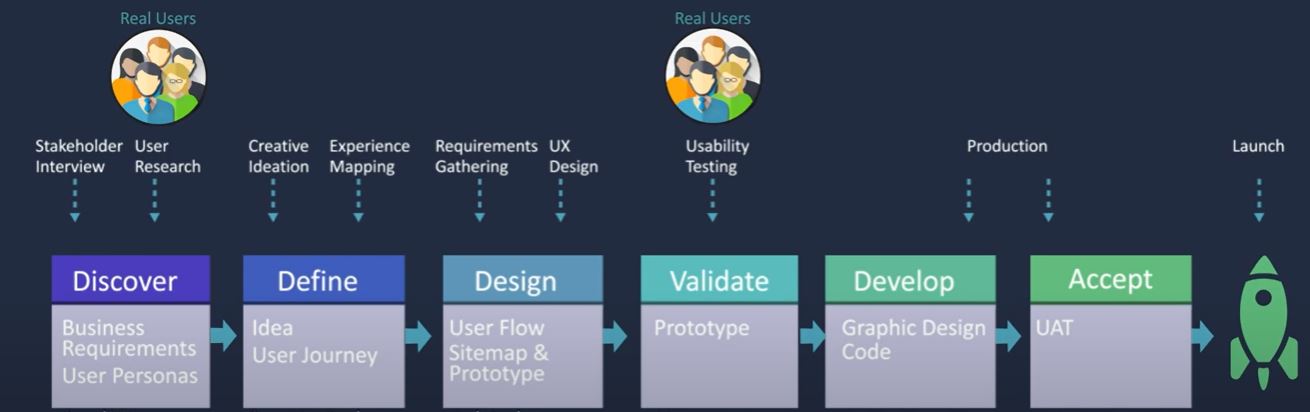
HUMAN-CENTERED DESIGN PROCESS
|
Phase 1: USER RESEARCH/DISCOVER
To obtain data with minimum bias, we utilized triangulation. We collected three types of data via three methods and used 3 members of Team clearAvenue to conduct the user research. We interviewed and stopped at 5 end users when we noticed the repetition of data points. We interviewed 3 CMS admins, observed and collected common data regarding issues, challenges and usability limitations. (1) We used three methods to collect data from two different types of POW users, End users and CMS Admins:
(3) The Observation, Contextual interviews and one-on-one interviews, were conducted by the expert HCD Specialist from Team clearAvenue, over a span of 3 days. To review problems received through emails and Help desk trouble tickets, we used two developers, an HCD/ Usability SME who went through all the information individually and summarized and submitted it to the HCD SME, in one week. RESEARCH QUESTIONS THAT EMERGE ALIGN WITH PROBLEM STATEMENT. |
|
2. DEFINE
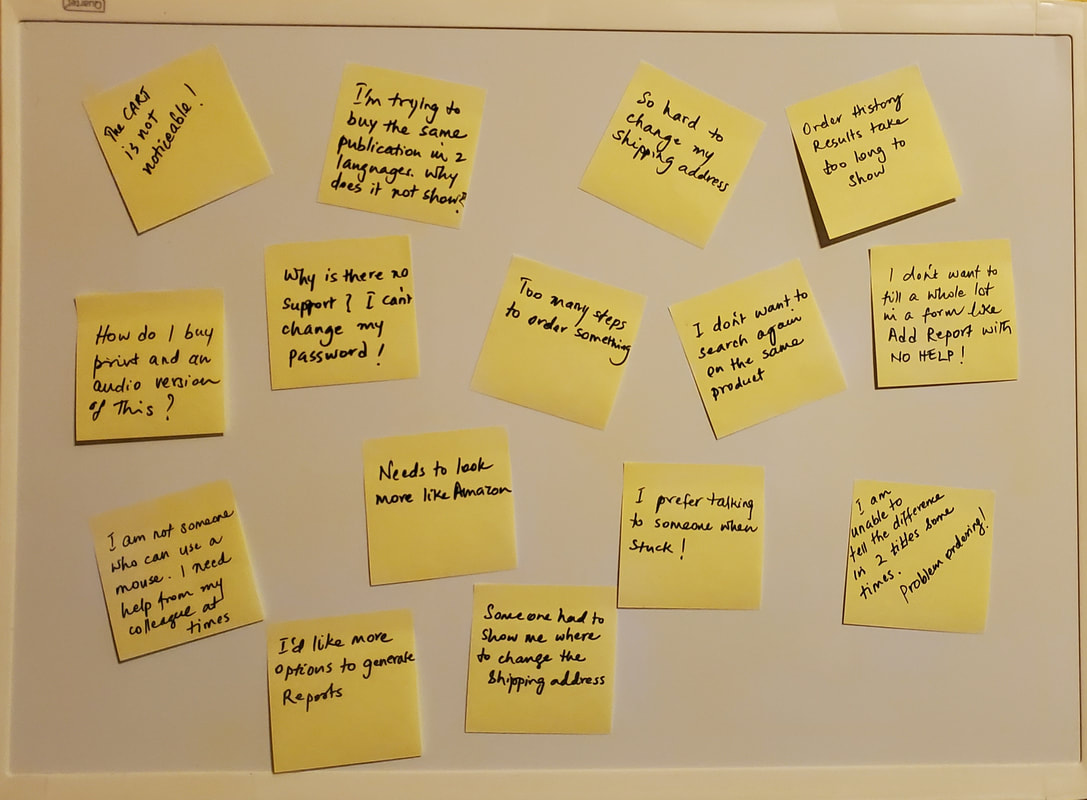
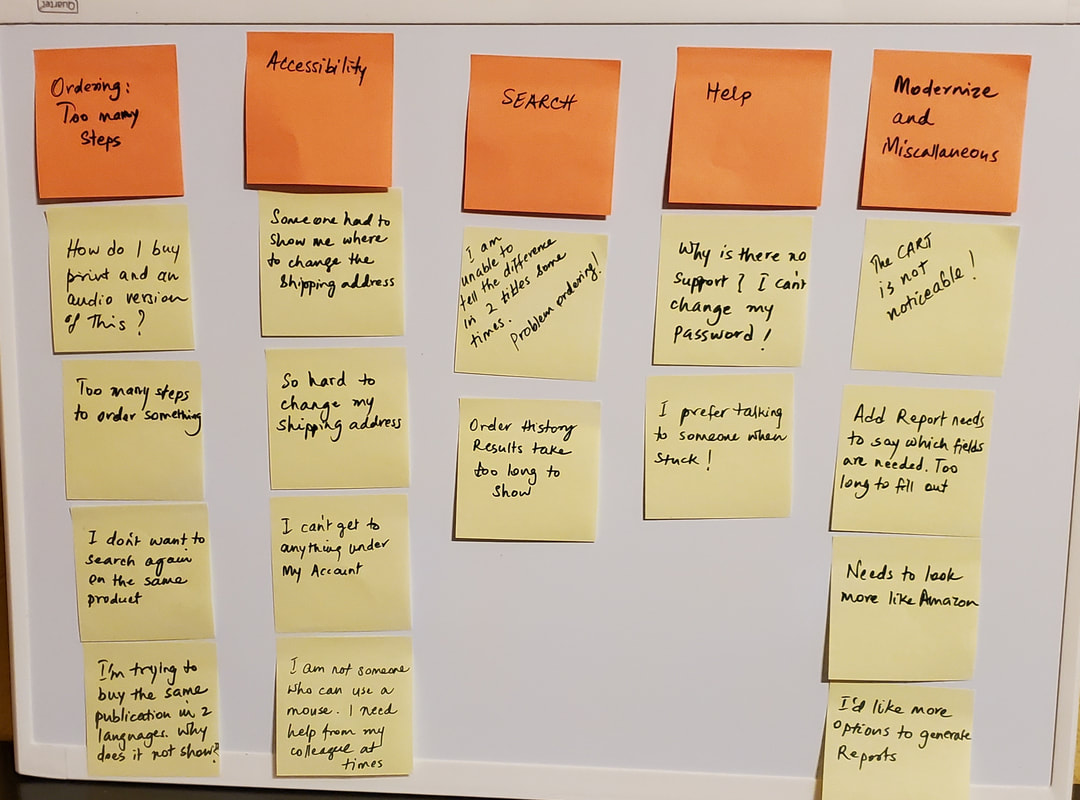
Next, we took all the repeated quotes or comments from users from our field notes and entered each on a post-it note and stuck them on a white board. Then we sorted and grouped the repeating ones, and gave them a heading, such as Ordering Issues, Accessibility, Search, etc.
These categories provided Key Insights and were our problems to solve.
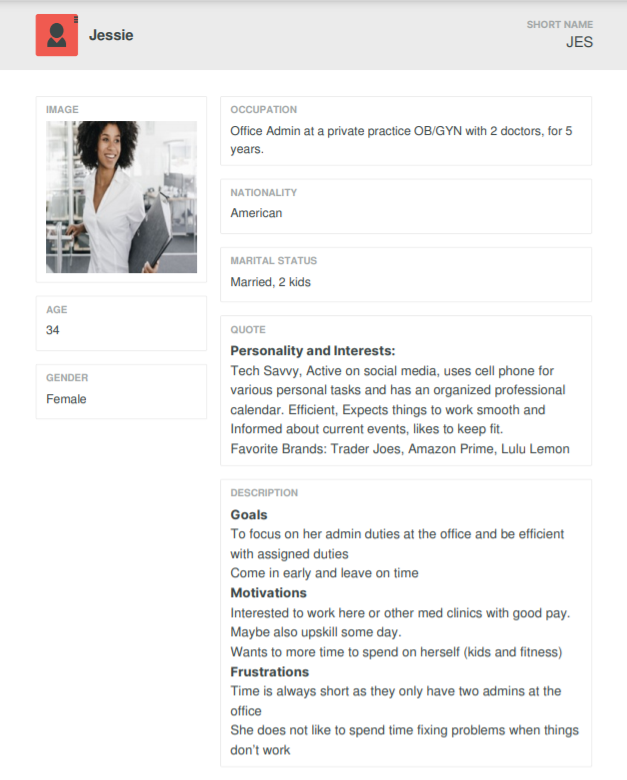
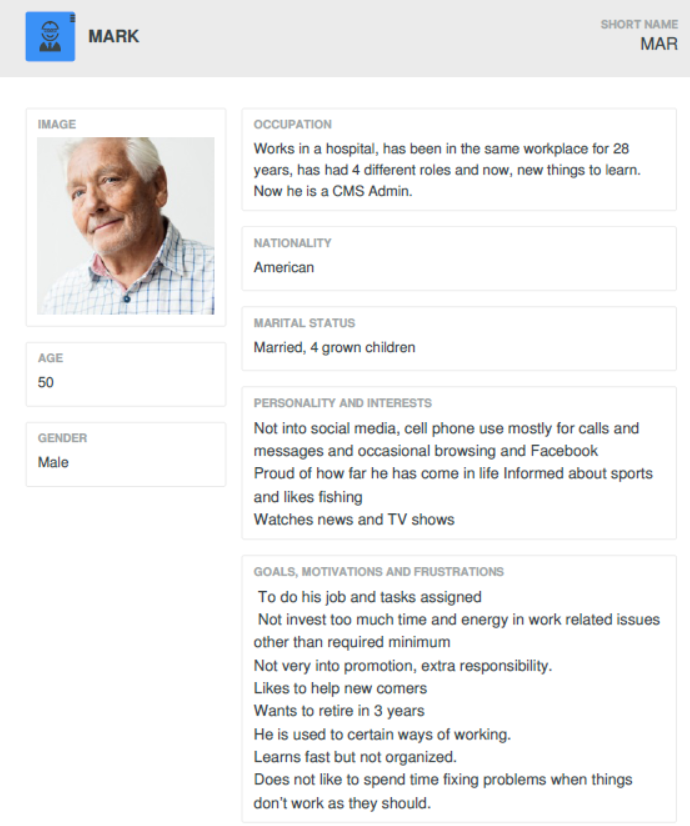
The collected data also provided us the basis for creating Persona characteristics for each of the identified Personas as shown below. We created Jessie, Mark and Diego as three Personas.
Journey Maps and identified pain points in their Journey towards accomplishing given tasks were created. This helped identify opportunities for improvements in interaction design.To promote inclusion, we accommodated dissenting views in our user research.
Between the HCD specialist and the development team, we ideated on
How might we solve the Accessibility problem?
How might we make Search more effective?
How might we enable all products to show up on a page and enable the user to pick any language or media format for that product?
Next, we took all the repeated quotes or comments from users from our field notes and entered each on a post-it note and stuck them on a white board. Then we sorted and grouped the repeating ones, and gave them a heading, such as Ordering Issues, Accessibility, Search, etc.
These categories provided Key Insights and were our problems to solve.
The collected data also provided us the basis for creating Persona characteristics for each of the identified Personas as shown below. We created Jessie, Mark and Diego as three Personas.
Journey Maps and identified pain points in their Journey towards accomplishing given tasks were created. This helped identify opportunities for improvements in interaction design.To promote inclusion, we accommodated dissenting views in our user research.
Between the HCD specialist and the development team, we ideated on
How might we solve the Accessibility problem?
How might we make Search more effective?
How might we enable all products to show up on a page and enable the user to pick any language or media format for that product?
|
|
JESSIE'S JOURNEY MAPS
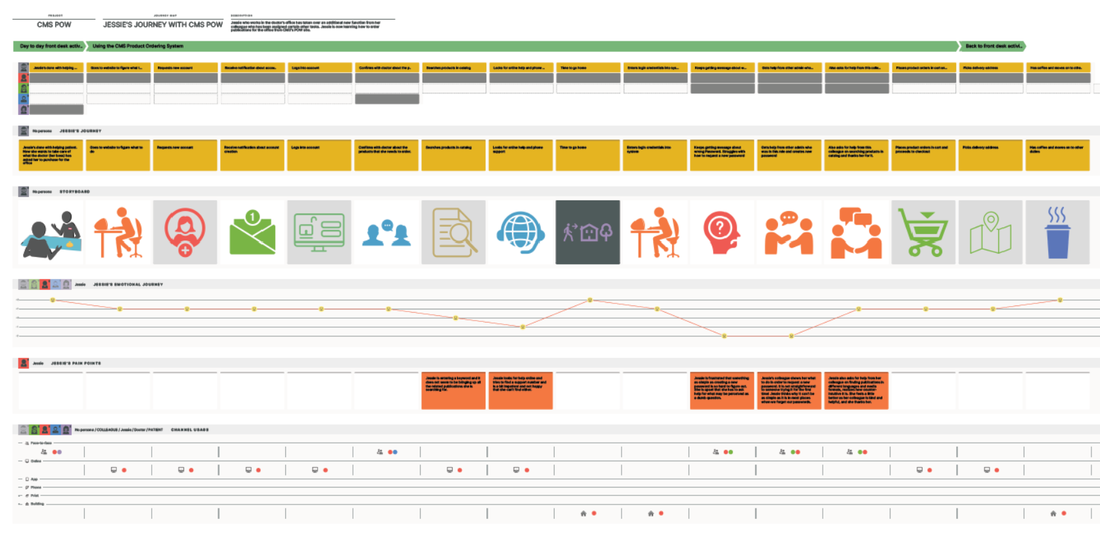
Click on this image for pdf which can be zoomed in for better readability
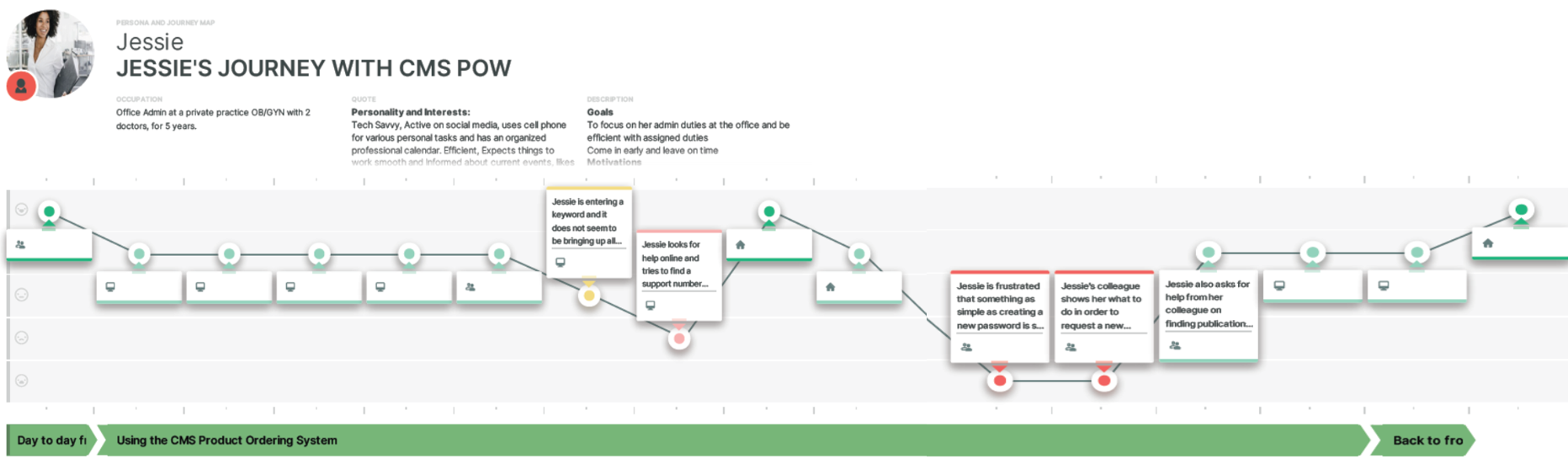
Click on this image for pdf which can be zoomed in for better readability
DIEGO'S JOURNEY MAPS
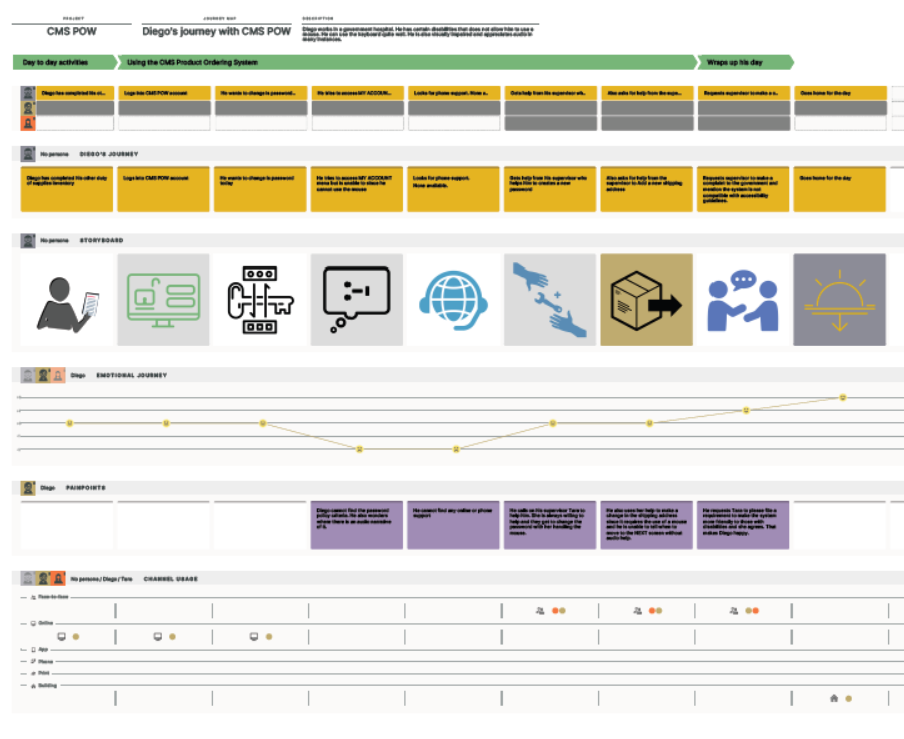
Click on this image for pdf which can be zoomed in for better readability
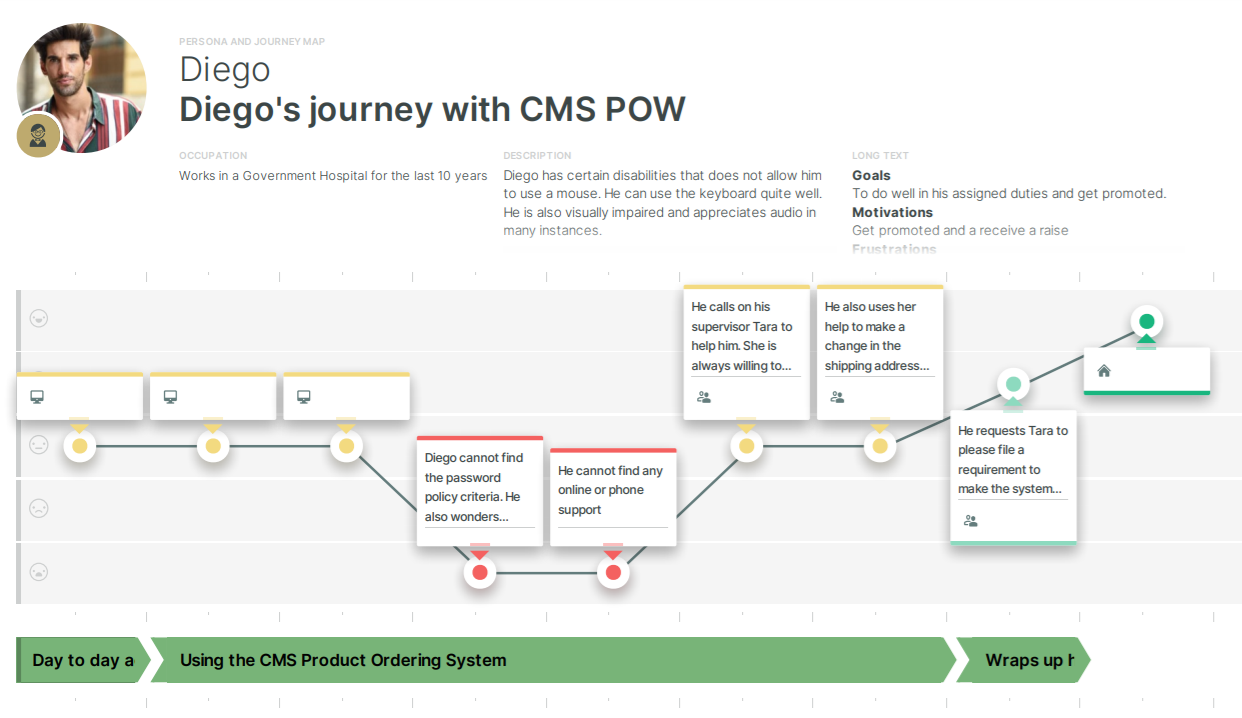
Click on this image for pdf which can be zoomed in for better readability
MARK'S JOURNEY MAPS
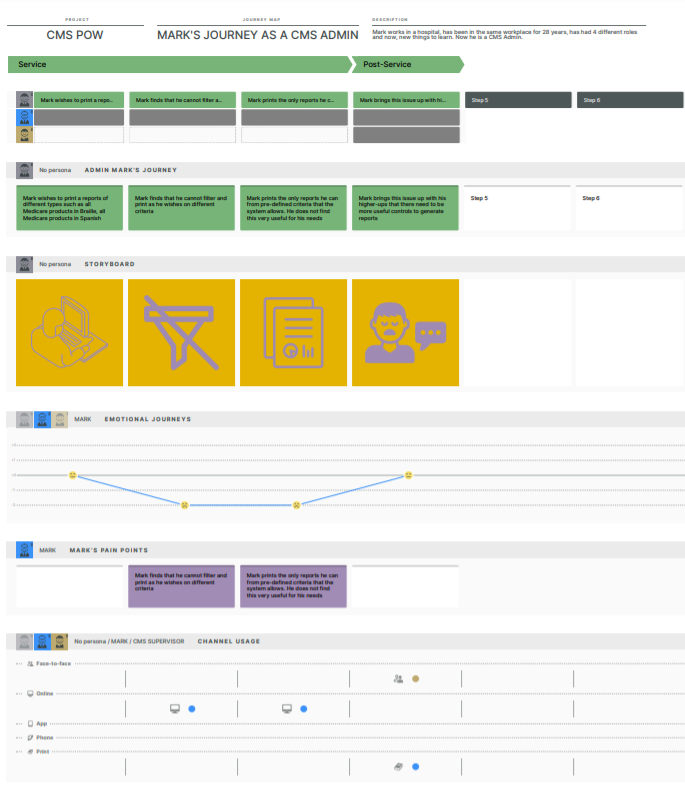
Click on this image for pdf which can be zoomed in for better readability
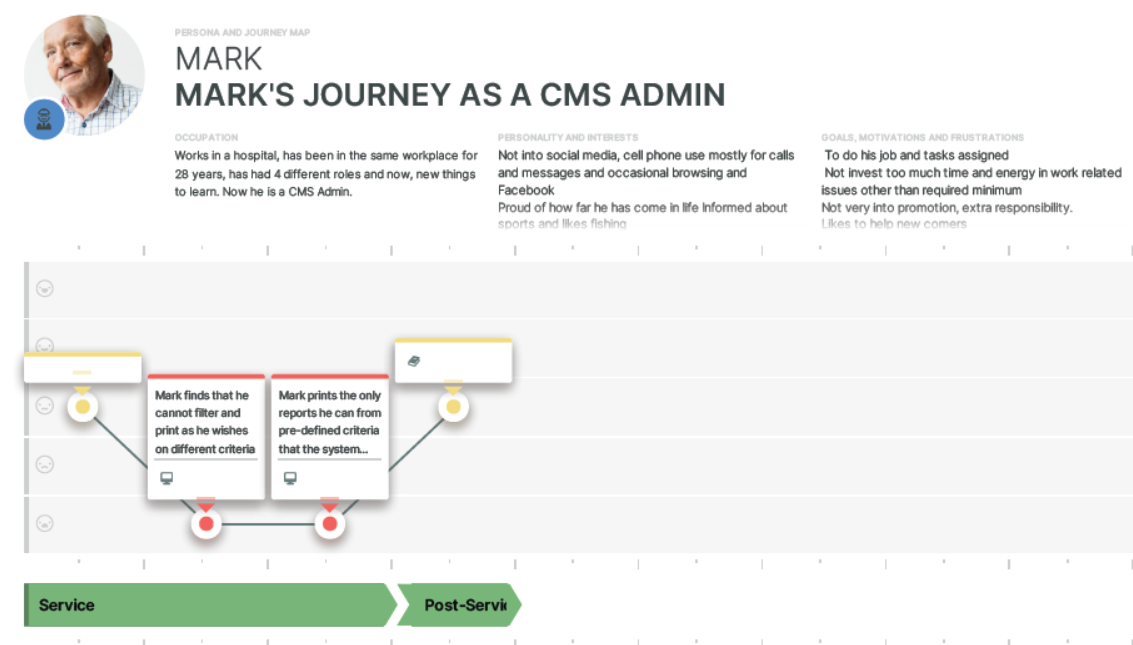
Click on this image for pdf which can be zoomed in for better readability
Phase 3: DESIGN
The Personas, and the Journey Maps for the personas and the identified pain points served as findings and artifacts from all the user research and also drove our interaction design. We created an initial design and validated the design with the user groups. Wireframes were created and a prototype was developed to obtain user feedback.
A VERY BIG CONSTRAINT: There was a key requirement to keep the legacy look and feel to minimize the training and related costs. If there were no constraints, we would have given the POW a modernized look and feel and would have moved away from the legacy look and feel.
Other constraints: Minimum time to deploy a modernized POW system to production and a lack of access to the legacy development contractor for timely answers to questions.
It was not hard to do quick testing with actual users when we had to test features. Users were cooperative.
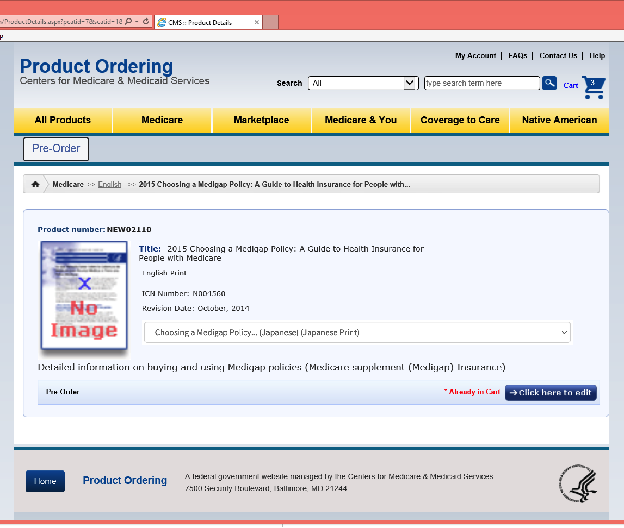
In the example below, the users were trying to order multiple copies of the product “2015 Choosing the Medigap policy: A guide to health insurance for people with Medicare” in multiple languages.
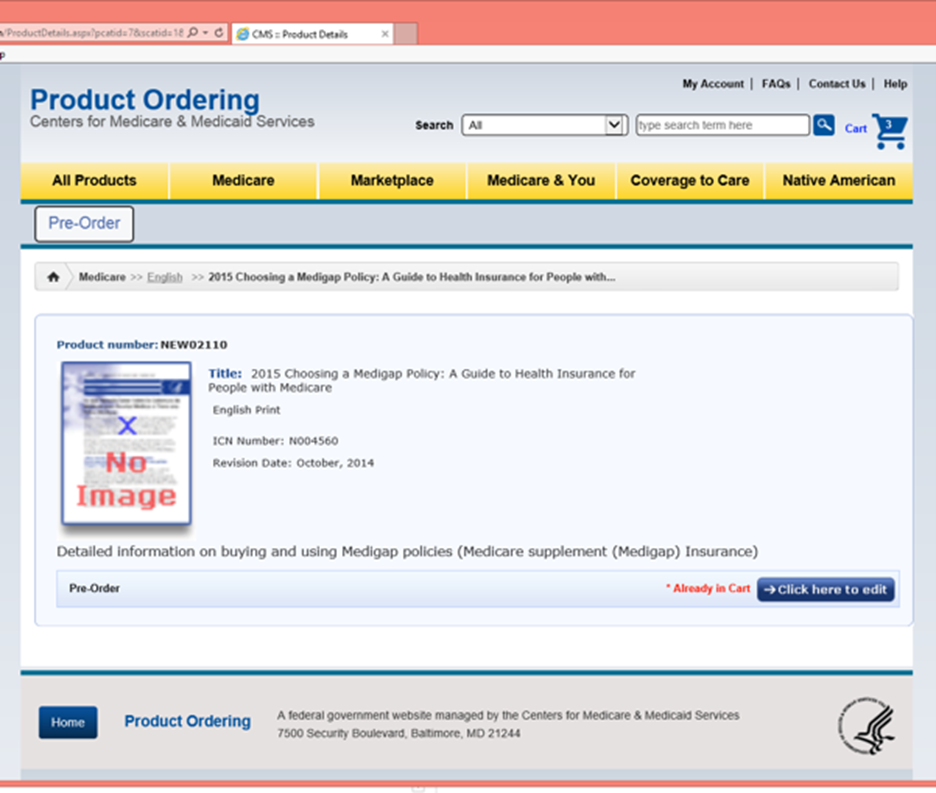
Existing design of Legacy system with ordering product one at a time
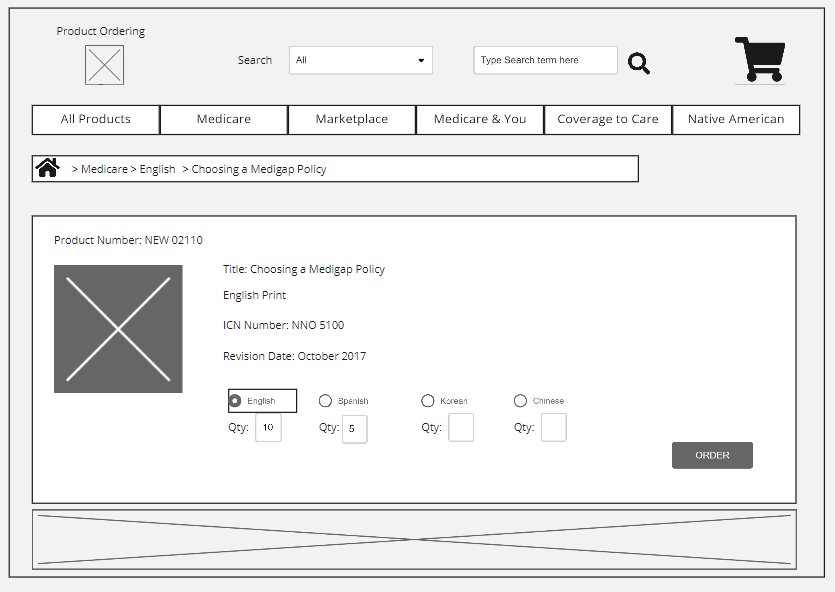
Starting Wireframe on Miro
The above Wireframe was converted to a prototype below and that was iterated to subsequent versions.
In the first design draft below, we added radio buttons and a quantity for each available language option so that users could choose Medigap in different languages in multiple quantities.
In the first design draft below, we added radio buttons and a quantity for each available language option so that users could choose Medigap in different languages in multiple quantities.
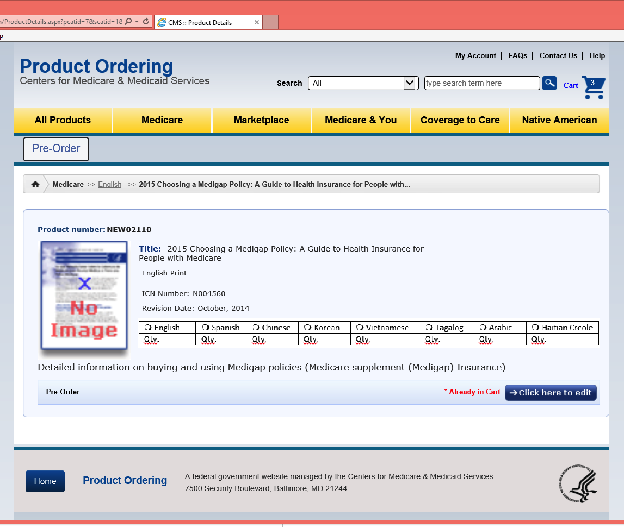
PHASE 4: VALIDATE/TEST THE PROTOTYPES WITH REAL USERS AND MAKE ITERATIVE CHANGES
Usability Testing/Evaluative Research: A test environment was created, and a few users were invited on a set date to execute on the task scenarios that were set up.
Limitations with iteration 1:
- Added extra clicks and typing when trying to add products
- Added some confusion to which product is currently being viewed
- Inconsistent and confusing UI because not all publications have the same or even same number of languages available.
Iteration 2: We went back and changed the design to look as below, using check boxes.
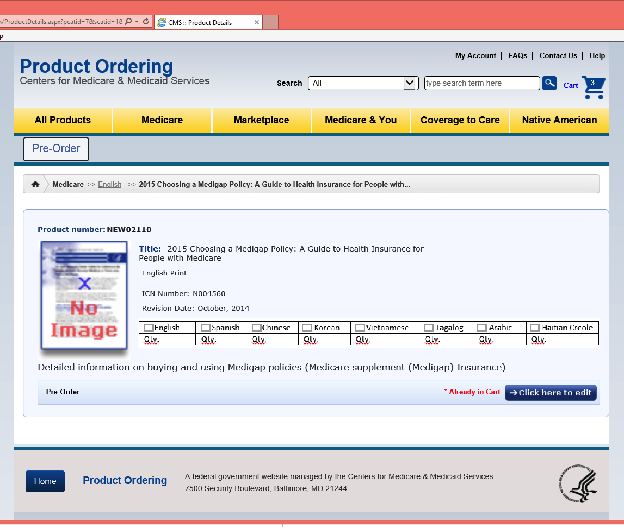
We conducted a usability test again.
Limitations with iteration 2:
- In testing we found this option resulted in more accidental items being selected and added more work.
- It also still had the issue of inconsistent UI for languages.
So we had to think of another control for the design.
Limitations with iteration 2:
- In testing we found this option resulted in more accidental items being selected and added more work.
- It also still had the issue of inconsistent UI for languages.
So we had to think of another control for the design.
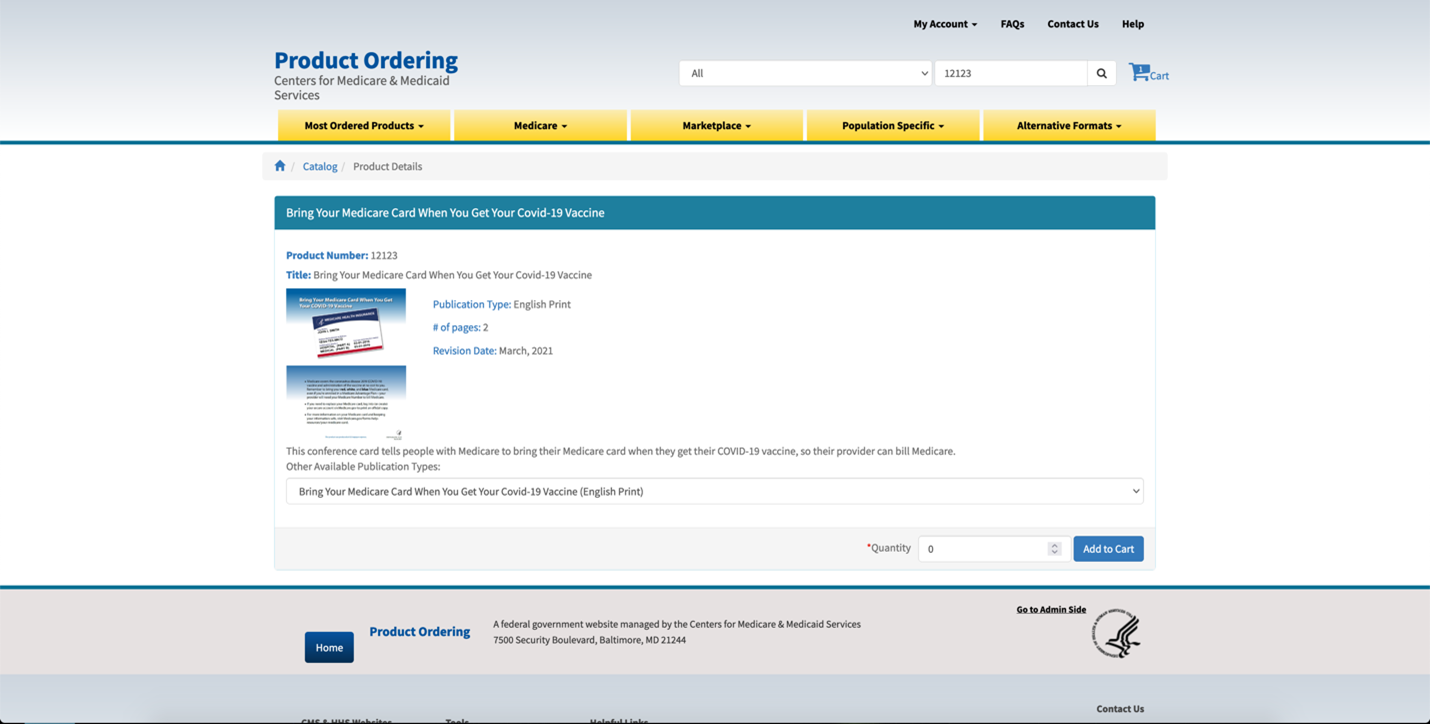
Iteration 3: Added a dropdown to select the language
We conducted a quick usability test with users again.
This iteration solved the issue of multiple clicks and re-typing quantity and helped clear up which publication was being viewed because only the currently selected language was visible. It did make the user click “Add to cart” every time which also reduced the number of accidental items. Iteration 3 was the end iteration that was implemented.
We conducted a quick usability test with users again.
This iteration solved the issue of multiple clicks and re-typing quantity and helped clear up which publication was being viewed because only the currently selected language was visible. It did make the user click “Add to cart” every time which also reduced the number of accidental items. Iteration 3 was the end iteration that was implemented.
Phase 5: DEVELOP
The Final Solution: Implemented a way that a user can navigate/view the different available languages of a publication from any of the languages. i.e., if on the English version and want the Spanish version, the user should be able to switch to that without re-searching or going back to the main catalog. The solution was achieved after a few iterations of trying out different controls and aligning the design with the users’ mental model. It resulted in fewer clicks and eliminated repeated searches.
The Final Solution: Implemented a way that a user can navigate/view the different available languages of a publication from any of the languages. i.e., if on the English version and want the Spanish version, the user should be able to switch to that without re-searching or going back to the main catalog. The solution was achieved after a few iterations of trying out different controls and aligning the design with the users’ mental model. It resulted in fewer clicks and eliminated repeated searches.
PHASE 6: ACCEPT/UAT
The key results were Intuitive UI Design using HCD, Accessible interfaces that meet 508 compliance and improved Search feature that allowed for multiple language and format product search.
We performed extensive accessibility testing and worked with CMS accessibility testing experts to ensure that the released product met the accessibility guidelines. We used the CMS approved 508 testing tools such as JAWS and others to perform the testing and remediation. Our Personas included a person with disabilities to identify and remediate accessibility limitations.
Inclusion was a design goal for our team. We utilized all the data that we collected to comprehensively model the user behaviors and also included dissenting views. Our Personas were also designed with inclusion in mind and captured the spectrum of user views.
RESULTS/ IMPACT: Help desk tickets on issues of ordering in multiple languages and media formats, title truncation, password changes, searches and accessibility are negligible and infrequent. The feedback is more on modernizing the look and feel.
A DEMO OF SUCCESS:
Recently, as part of a RFP solicitation CMS asked us to create a video of the process we used on this project. See video below. This was a fine example of using my UX Writing skills as I had to write a concise and clear script to fit the time frame of 5 minutes.