
ELLIPSIS
Their mission is that through voice, they help people understand their emotional health.
PROBLEM STATEMENT #1
Severe User Experience issues with the product.
Ellipsis has already developed an app and have done User Testing on it. Their app requires users to pick topics and speak aloud. In the user testing. They noticed that the users ran in several serious issues. Ellipsis
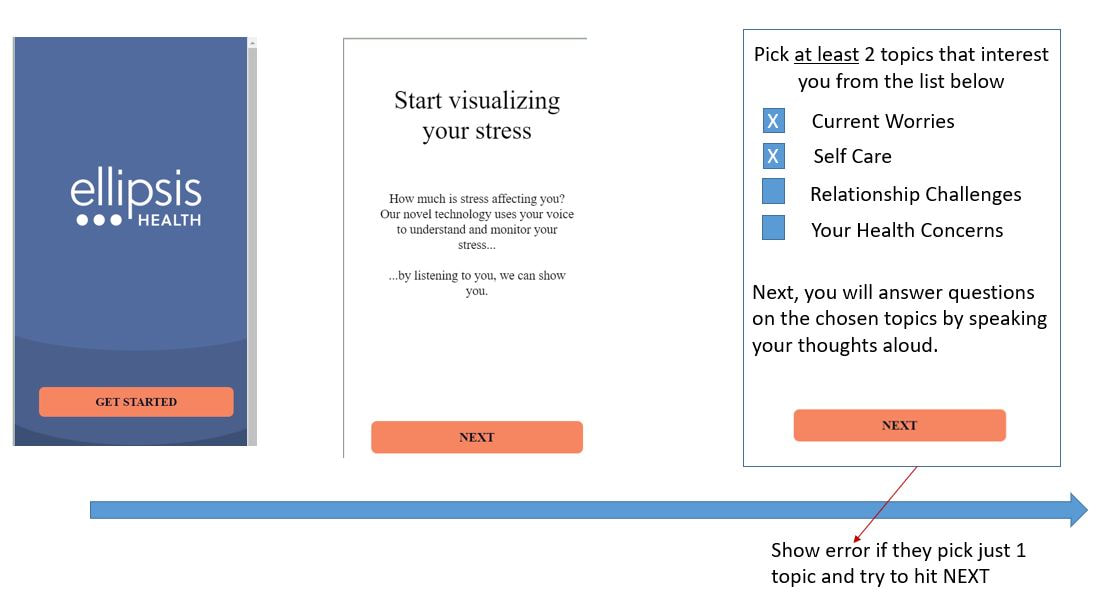
How can we get the users to pick 2 topics and choose one question or more from each of the 2 topics? They want the users should speak a total of 90seconds and can go up to 4.5 minutes. This would give their AI tool enough content for analysis. Less than 90secs will give no results back.
Mind Your Gaps was brought in to review, analyze and fix these problems.
CONSTRAINTS
Told not to change the look and feel too much and if possible, change minimum functionality! For a UX designer, this is a red flag!
METHODOLOGY:
RESEARCH
1. Cognitive Walkthrough of the Mobile App
Jyothi spent an hour using the app and making notes on usability problems she saw with every page of the app. There were several usability issues but these UI/UX issues particularly struck me
2. Review of Usability Testing Videos of 10 users
Common issues faced by users in Usability Testing (the testing was done on UserTesting.com platform with 10 users over 2 iterations)
Based on the above evaluation and testing, iteration 1 was created to solve some challenges, keeping their constraint in mind. However, as a designer, I was not happy with the solution because I really wanted to change a lot of the UI itself (look, feel, navigation).
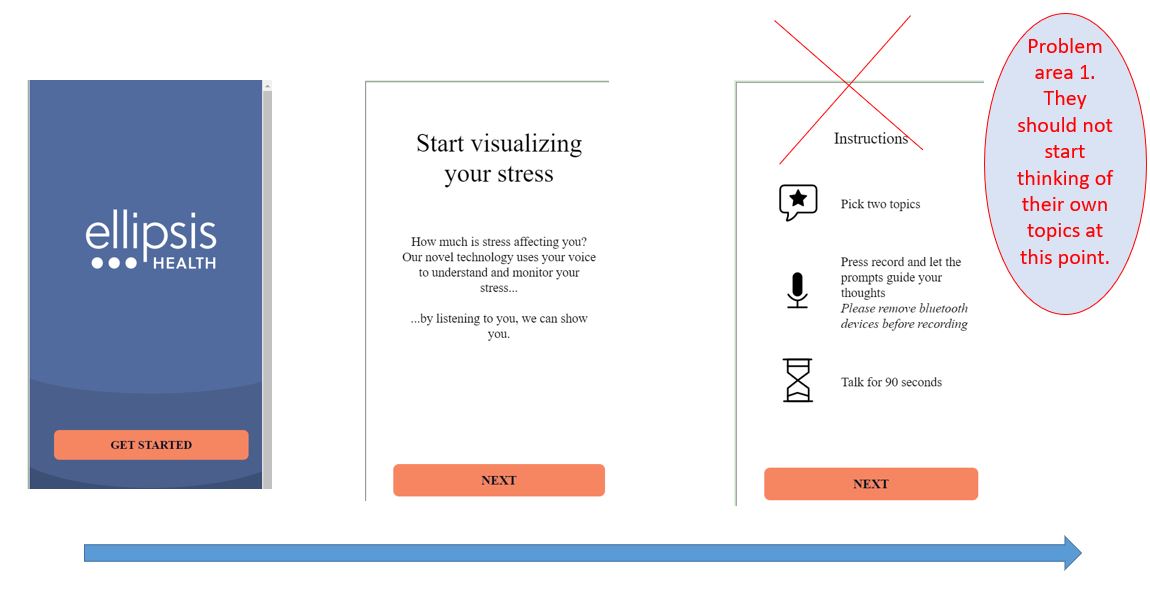
ITERATION 1: This design, drawn as a User Story/Storyboard, solved many of the above problems but the app did not have a way of determining in real time what the user was doing, which question they were answering and whether they picked two different topics or not, in order to give feedback messages.
Their mission is that through voice, they help people understand their emotional health.
PROBLEM STATEMENT #1
Severe User Experience issues with the product.
Ellipsis has already developed an app and have done User Testing on it. Their app requires users to pick topics and speak aloud. In the user testing. They noticed that the users ran in several serious issues. Ellipsis
How can we get the users to pick 2 topics and choose one question or more from each of the 2 topics? They want the users should speak a total of 90seconds and can go up to 4.5 minutes. This would give their AI tool enough content for analysis. Less than 90secs will give no results back.
Mind Your Gaps was brought in to review, analyze and fix these problems.
CONSTRAINTS
Told not to change the look and feel too much and if possible, change minimum functionality! For a UX designer, this is a red flag!
METHODOLOGY:
RESEARCH
1. Cognitive Walkthrough of the Mobile App
Jyothi spent an hour using the app and making notes on usability problems she saw with every page of the app. There were several usability issues but these UI/UX issues particularly struck me
- They choose 2 topics but when they start scrolling through questions they see questions from ALL topics? Why? Didn't they just filter to two?
- They have to keep clicking on and on to be able to see questions and it is not clear which topics the questions fall into.
- Plus they are unable to see all questions before deciding which ones they want to answer.
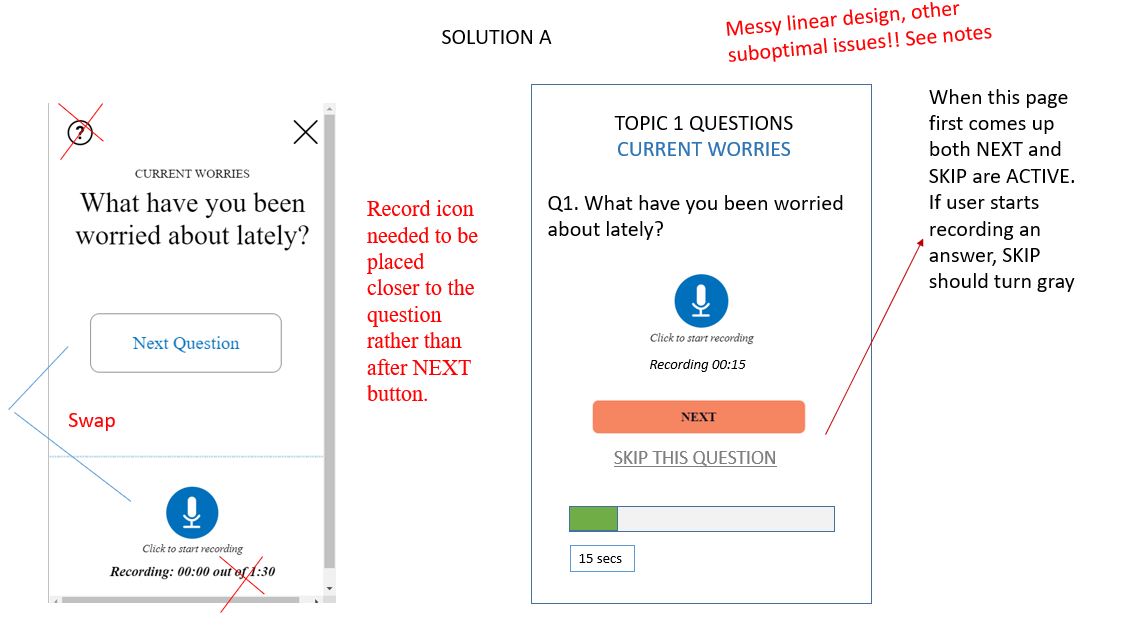
- Placement of Next Question button and Microphone were confusing which led people to take an action that they could not undo
- The instructions were all given upfront in wordy language which no one who remember when they needed to act (instructions needed to be concise and with the CTA screen)
- The language overall was very wordy. Needed better UX writing.
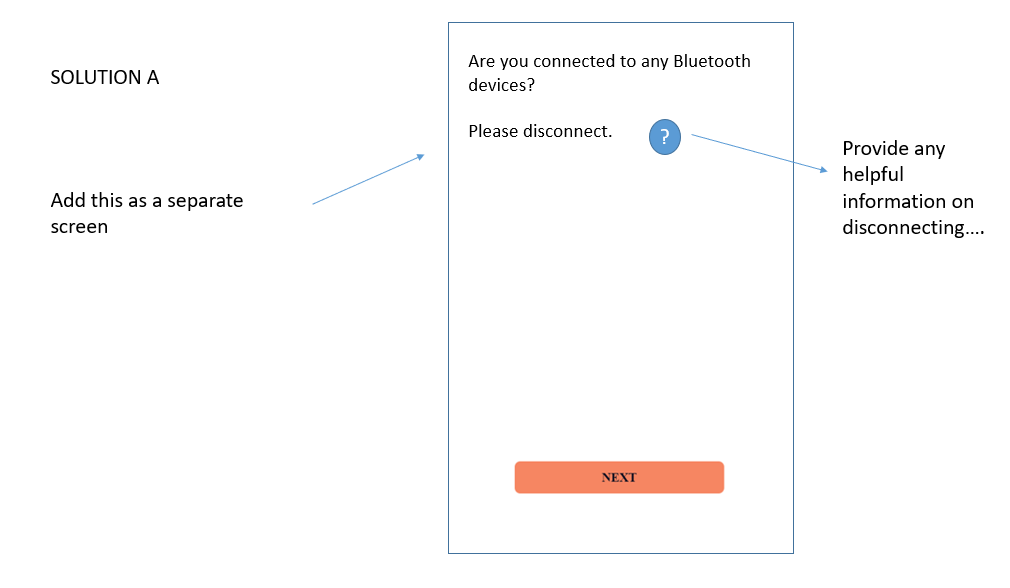
- Not everyone knows how to disconnect Bluetooth.
2. Review of Usability Testing Videos of 10 users
Common issues faced by users in Usability Testing (the testing was done on UserTesting.com platform with 10 users over 2 iterations)
- Many users begin to speak even before they select the topics - they talk about their own topic.
- Secondly, they notice that there are questions and pick those to answer. Ellipsis requires users to speak for a total of 90 secs but invariably, each user thinks they have to spend 90 mins on a question and they think they have to answer every question there is.
- When they realize that they have exceeded the time limit, they are confused and try to go back and restart everything but they get a error message and cannot continue!
Based on the above evaluation and testing, iteration 1 was created to solve some challenges, keeping their constraint in mind. However, as a designer, I was not happy with the solution because I really wanted to change a lot of the UI itself (look, feel, navigation).
ITERATION 1: This design, drawn as a User Story/Storyboard, solved many of the above problems but the app did not have a way of determining in real time what the user was doing, which question they were answering and whether they picked two different topics or not, in order to give feedback messages.
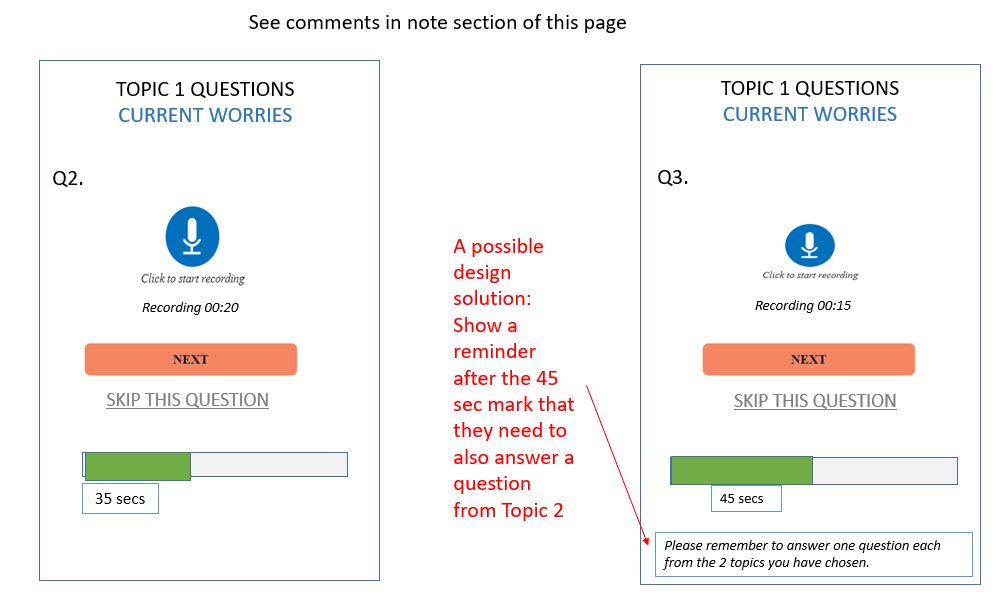
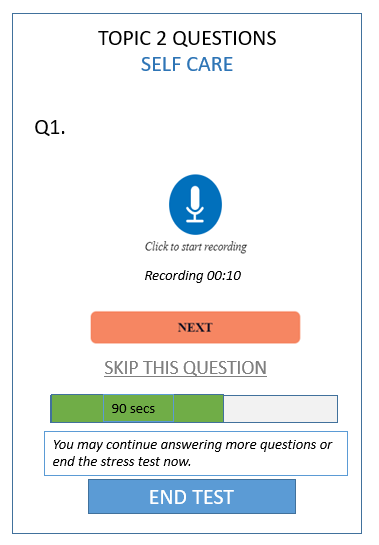
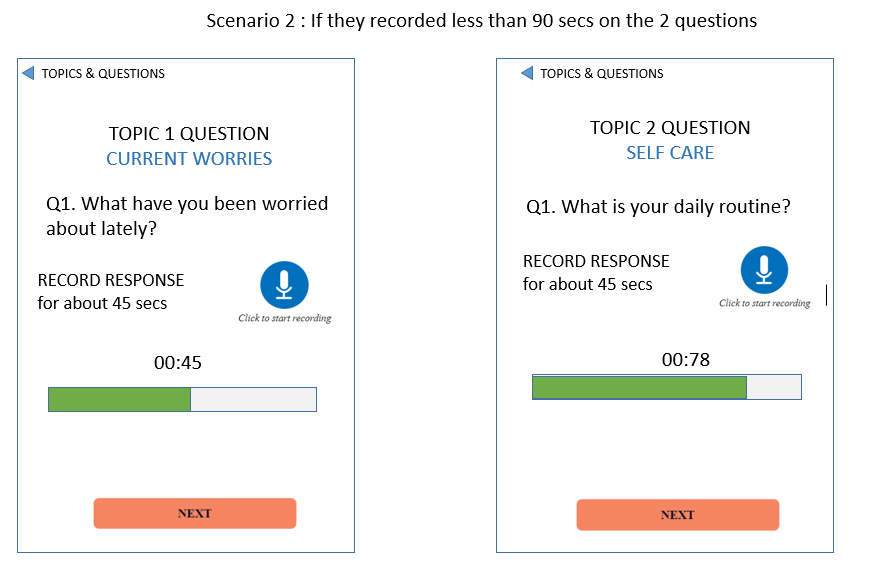
PROBLEM STATEMENT #2: How can we get the users to answer 2 questions on 2 topics for approximately 45 seconds each?
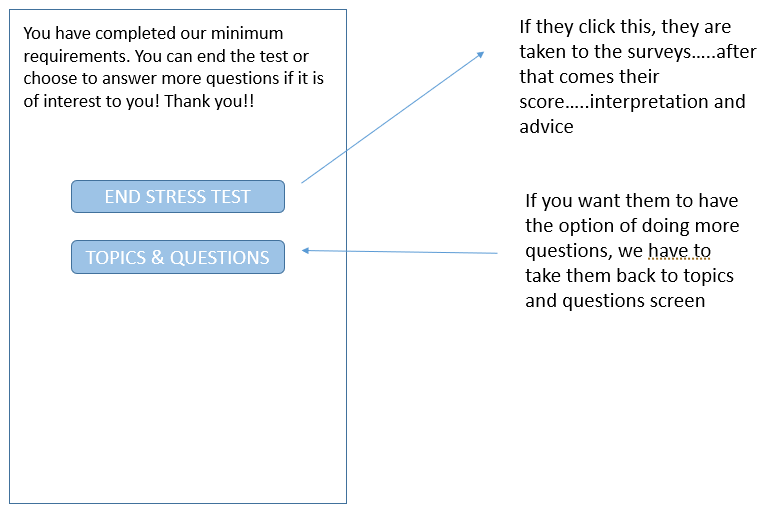
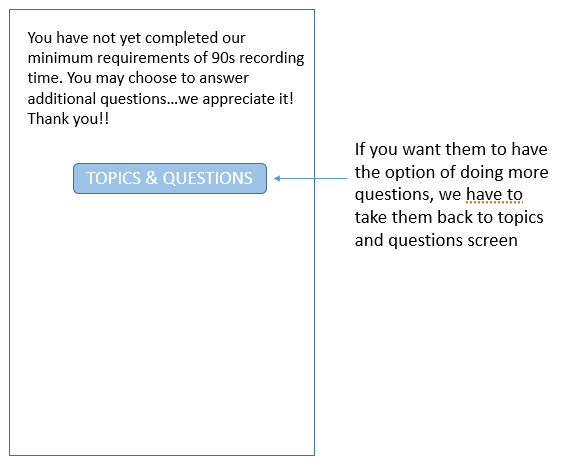
ITERATION #2: Recommended a different way of displaying topics and questions. Although they were not free to change the current look and feel drastically, they say the value this kind of design brought in compared to the current one.
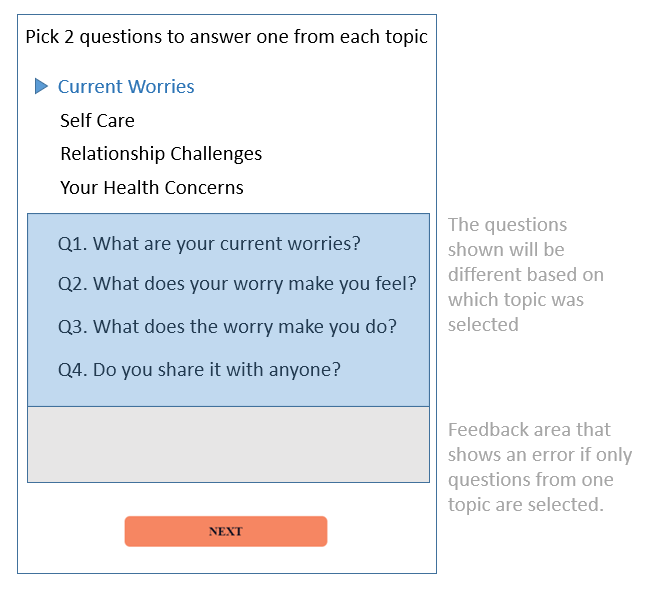
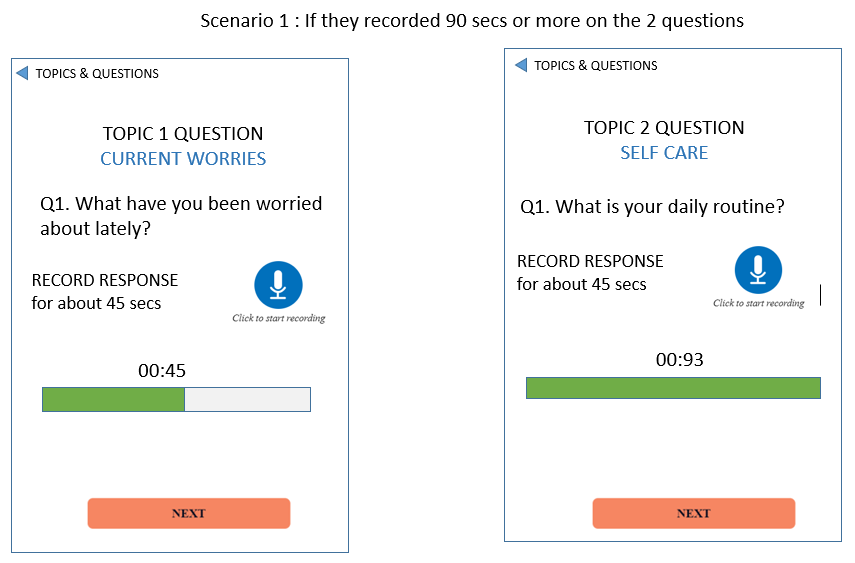
|
|
|
|
|
All the design iterations are for showing functionality and navigation only. The visual designers need to determine which UI to adopt.
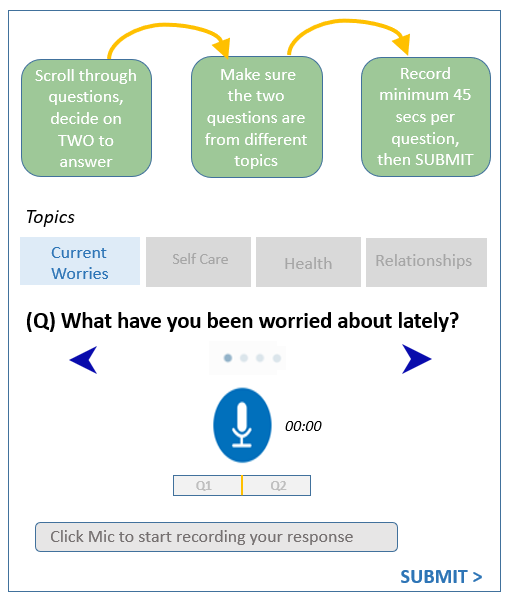
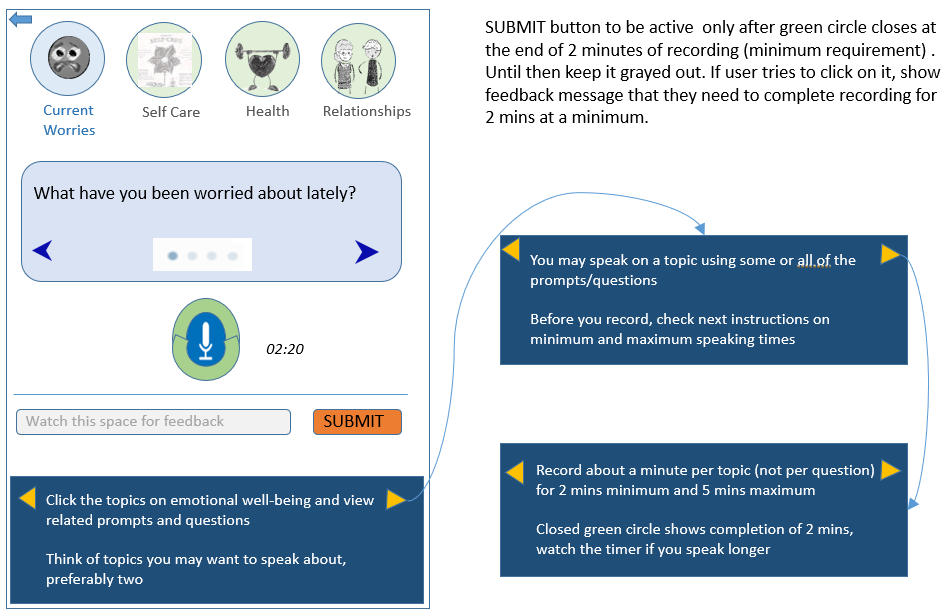
Iteration #3: Here I tried to bring in the instructions into the page where the CTA was. This would serve to refresh the user's memory on what they need to do. |
|
ITERATION #4: The instructions were moved to a panel below, Also answer time was increased.
A CHANGE IN PREMISE:
By now I had some fundamental doubts on the need for the user to answer specific questions versus speaking free form on the topic.
I questioned the client on this and they began to realize that the questions only added to confusion as users thought it was mandatory to answer each one. My recommendation was to change the question to prompts that the user could use as a guide only if they wanted to. This was like going to the drawing board again.
Since the project that was expected to take a month long and I thought it was pretty simple to start with I was using Powerpoint. However, as it started to stretch into two along with new problem definitions and scope, I ditched Powerpoint and started to use Framer build a clickable prototype that showed the interaction design and the User flow on a mobile screen, This was meant for the developers and not for the end users to do any usability testing.
I also used Miro to show the User Flow and Story mapping as I found this tool easier and faster to use at that point in time.
By now I had some fundamental doubts on the need for the user to answer specific questions versus speaking free form on the topic.
I questioned the client on this and they began to realize that the questions only added to confusion as users thought it was mandatory to answer each one. My recommendation was to change the question to prompts that the user could use as a guide only if they wanted to. This was like going to the drawing board again.
Since the project that was expected to take a month long and I thought it was pretty simple to start with I was using Powerpoint. However, as it started to stretch into two along with new problem definitions and scope, I ditched Powerpoint and started to use Framer build a clickable prototype that showed the interaction design and the User flow on a mobile screen, This was meant for the developers and not for the end users to do any usability testing.
I also used Miro to show the User Flow and Story mapping as I found this tool easier and faster to use at that point in time.
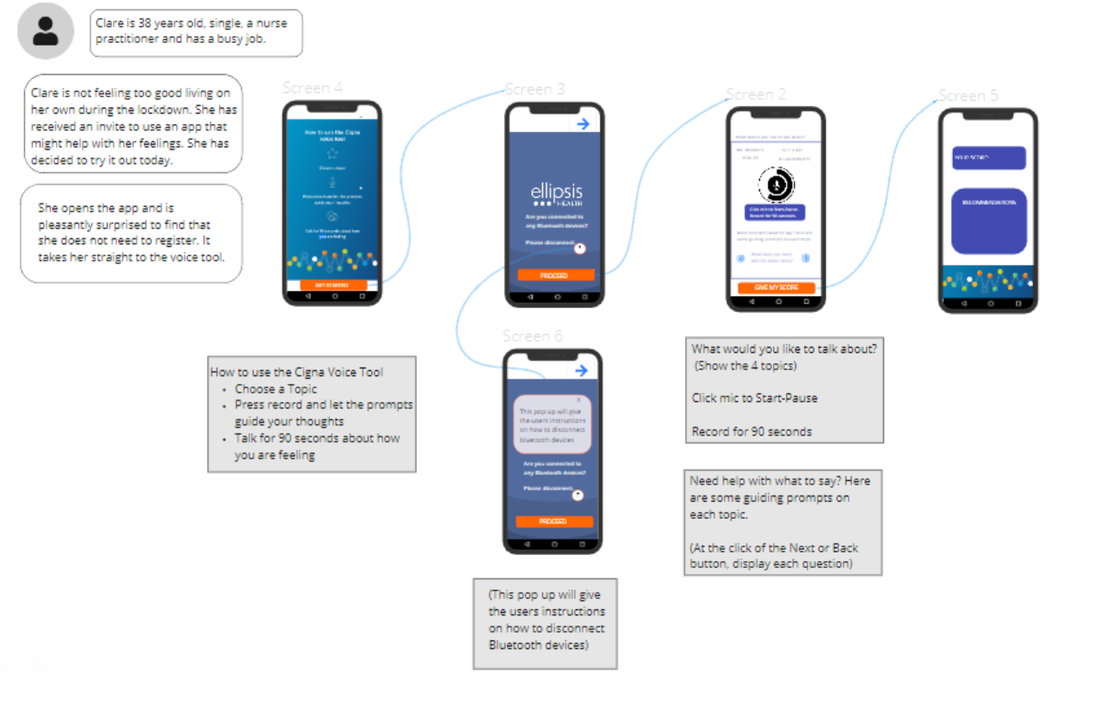
Drawn in Miro
|
RESULTS: The design concepts were next translated into UI by the visual designers (not shown here). The above prototype was extremely useful for them to understand how it needed to work. Next, I created a Usability plan for them to test the development prototype,
IMPACT: Recently, it has been launched into the Cigna Website. Thousands of users have access to it. There is no data yet about how the app is being received. |
Click for pdf
|
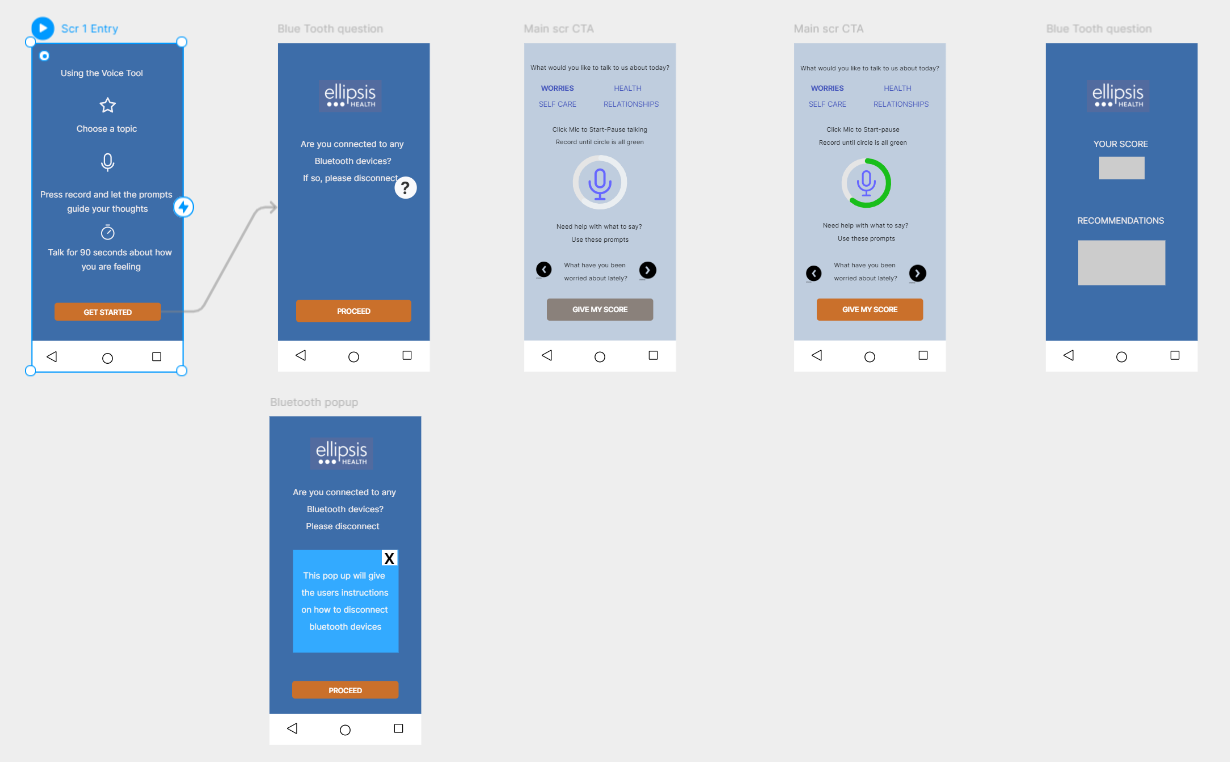
Interactive prototype User Flow - Tool Framer
|
|